
Turn Your Photo Sessions Into SEO Content Automatically
Picture Perfect Blogs automatically generates a complete SEO Stack! Including SEO-optimized alt text, blog posts, meta titles, descriptions, keywords, hashtags, and a schema file from your images.
This helps Google understand and give you credit for your images because Picture Perfect Blogs generates and applies SEO alt text to your images automatically. It not only suggests unique SEO rich alt text for each image, it instantly applies it to each image without you lifting a finger! Turning what used to be a painful time consuming chore (if you even took the time to do it) into a powerful local search engine asset!
Works directly inside your WordPress dashboard!
Blogging Your Sessions Takes Too Much Time!
Uploading Images
Writing unique & descriptive SEO rich alt text for each image… over and over.
Writing Blog Posts
Turning a photo session into a story takes time most photographers don’t have.
SEO Optimization
Most photographers know blogging helps SEO… but doing it consistently is exhausting.

Picture Perfect Blogs Does the Work for You
01.
Batch Alt Text Generation
Upload your entire session and watch AI instantly write unique, descriptive, keyword-rich alt texts for every single image — automatically.
02.
Complete Blog Posts in Minutes
Enter a few session details and let the plugin write a fully SEO-optimized blog post from your photos. Ready to publish in minutes, not hours.
03.
Rank Higher on Google
Alt texts are one of Google’s strongest image SEO signals. Better alt texts mean more visibility — and more clients finding you organically.
04.
Lives Inside Your WordPress Dashboard
No new apps, no complicated software. Picture Perfect Blogs installs directly into WordPress. If you can upload a photo, you can use this plugin.
05.
Your Images Stay Completely Private
Every photo is processed on a secure private server and permanently deleted after your session. Never stored, never shared, never used for AI training.
06.
Built for Photographers, Not Techies
No coding. No confusing settings. No learning curve. Just upload, click, and let AI handle the writing while you get back to shooting.
You became a photographer to create images – not spend hours writing and doing SEO.
You didn’t pick up a camera to spend your nights staring at alt text fields and blank blog post drafts. But without local SEO, your most beautiful work stays invisible, buried under competitors who rank higher simply because they write more.
Picture Perfect Blogs was built by a husband and wife photography team who lived this exact frustration. After years of doing this manually for their own photography website, they built the tool they always wished existed. Now the writing happens automatically, so you never have to choose between creating and growing.
Blog every session without writing and create page after page of Local SEO Gold every time!
3 Steps to Fully Automated SEO
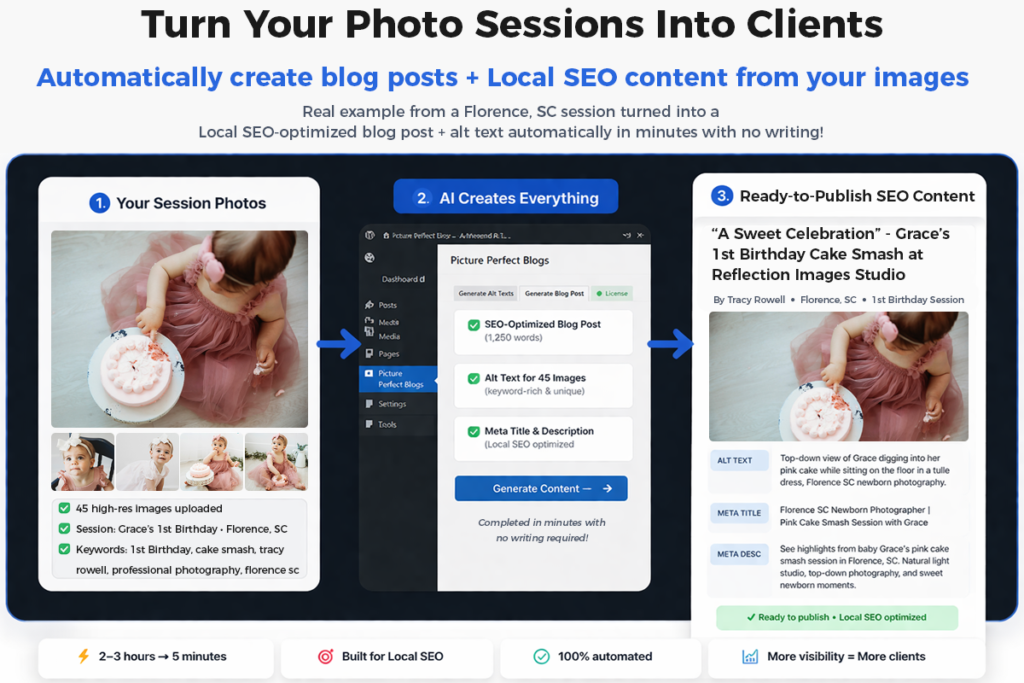
Step 1: Add the Picture Perfect Blogs plugin to your WordPress site in minutes – no developer needed.
Step 2: Select your session photos and enter a few basic details like client name, location, and style.
Step 3: Watch AI generate unique, keyword-rich alt texts for every image plus a complete, publish-ready blog post, title, description, keywords, hashtags and more in just minutes.
Start Turning Photo Sessions Into Blog Posts & Get Your Time Back?
Built For Photographers Who Want More Traffic
• Newborn photographers
• Family photographers
• Wedding photographers
• Portrait photographers
• Studio photographers
Perfect for photographers who want better Google rankings without spending hours blogging.
Blogging Helps Your Photography SEO
Publishing session blog posts helps you:
✔ Rank for local search terms
✔ Get found on Google Images
✔ Attract new clients organically
✔ Build authority in your market
Picture Perfect Blogs makes it easy to blog every session consistently.
Picture Perfect Blogs – Frequently Asked Questions
Does this work with any WordPress theme?
Yes. The plugin works inside the WordPress dashboard and is theme-independent.
Can I edit the generated blog content?
Absolutely. You can customize anything before publishing.
Will it create the actual blog page for me?
It generates the full blog post with titles and headings along with your meta title, meta description, a list of keywords and hashtags and a schema file. All of this can be copied with the click of a single button so you can paste into a text document. From there, you can edit and adjust as needed before copying and pasting your final draft into your preferred page builder inside of WordPress.
Does it work with existing images?
Yes. You can select images you just added to your media library or images that have been there for years.
Will it overwrite existing alt text I already have?
It’s up to you! You can select a toggle to either overwrite or skip any existing alt text for the images you’ve selected. This will preserve the alt text work you’ve already done or it can easily save you a ton of time if you do want to overwrite old, ineffective or non SEO rich alt text. There is NO NEED to delete or clear the old alt text first before generating new alt text. It will simply generate and insert new alt text automatically allowing you to quickly fix or correct your entire image library with ease!
How many images can I process at once?
There’s no limit to the amount of images you can select for each generation at this time. However, you will notice in the progress bar that it sends batches of 15 images at a time to the server for processing to prevent timeouts.